SeraVault CloudSync — Two-Way Cloud Sync for Linux
cloudsync.seravault.com
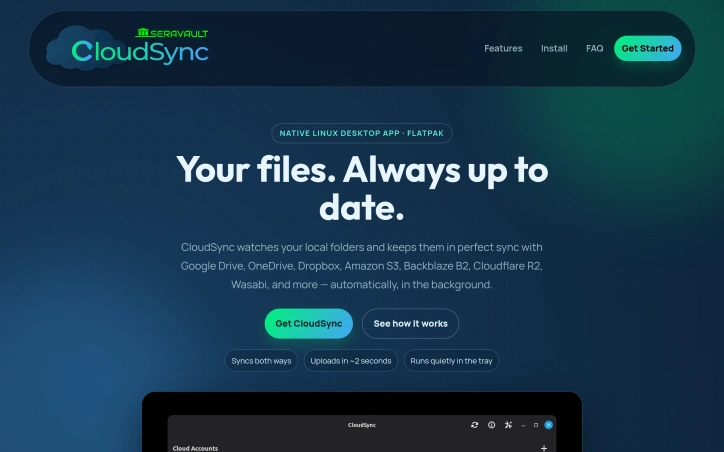
CloudSync is the native Flatpak Linux app that keeps your folders in sync with Google Drive, OneDrive, Dropbox, Amazon S3, Backblaze B2, Cloudflare R2, Wasabi and more.
Video Review
0:00 / 0:00
About
SeraVault CloudSync — Two-Way Cloud Sync for Linux
CloudSync keeps users' folders in sync with various cloud storage services including Google Drive, OneDrive, Dropbox, Amazon S3, Backblaze B2, Cloudflare R2, Wasabi, and more. It is a native Flatpak Linux app that runs quietly in the background, watching local folders and keeping them up to date with the connected cloud accounts. The app supports two-way sync, allowing changes from both the local machine and the cloud to be reflected in both locations. Users can control the sync interval for each folder, choosing from intervals such as 30 seconds, 1 minute, 5 minutes, or 15 minutes, or setting a global default.
The app features smart conflict resolution, allowing users to decide how to handle files changed in both locations. CloudSync stores cloud account logins only on the user's computer and never sends them elsewhere. The setup process is guided by a step-by-step wizard that connects cloud accounts and chooses sync folders without requiring technical setup. CloudSync is designed for Linux desktop users who need reliable cloud backup. It is available as a Flatpak bundle, with automatic updates available through the Flatpak ecosystem, supporting distributions such as Ubuntu, Fedora, Pop!_OS, Linux Mint, and Arch Linux.
Updated 6/26/2026
Key Features
Two-Way Sync
allows changes from both local machine and cloud to be reflected in both locations
Smart Conflict Resolution
allows users to decide how to handle files changed in both locations
Custom Sync Interval
allows users to control the sync interval for each folder
Secure Account Storage
stores cloud account logins only on the user's computer
Guided Setup
connects cloud accounts and chooses sync folders without requiring technical setup
Use Cases
01
Linux Desktop Users — need reliable cloud backup for their local folders
02
Users with Multiple Cloud Accounts — can sync with various cloud storage services
03
Users Requiring Data Consistency — can ensure changes are reflected in both local and cloud storage
Ratings & reviews
No reviews yet. Be the first!
Preview
Related listings


 Sponsor