envdesk.app favicon

EnvDesk - Local-first .env manager

envdesk.app

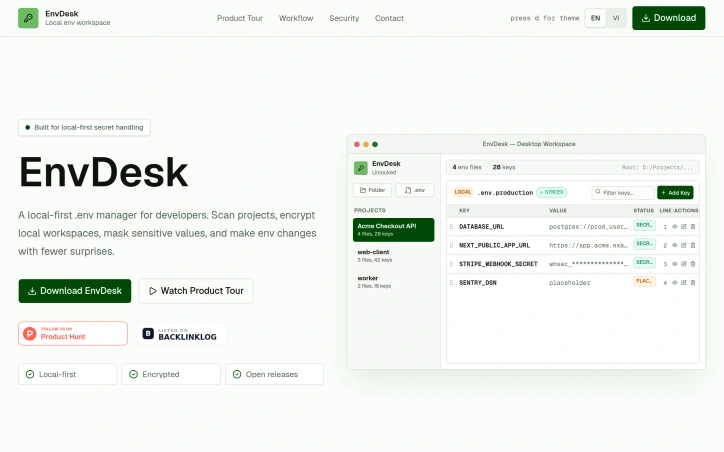
EnvDesk is a local-first .env manager for developers. Scan, mask, organize, and safely edit .env files in an encrypted desktop workspace.

Video Review
0:00 / 0:00

About

EnvDesk - Local-first .env manager

Developers can manage environment variables across multiple projects with a focused desktop workspace. This local-first .env manager scans projects, encrypts local workspaces, masks sensitive values, and enables environment changes with fewer surprises. It automatically discovers and maps all environment files when a project folder or .env file is imported. The application protects variables with AES-256-GCM passphrase encryption and features an approval-first workflow that requires confirmation before writing changes back to local files, preventing accidental overwrites. Users can add, edit, delete, or reorder keys within the application, with the layout mirroring the .env file. The inline editor allows for drag-and-drop reordering, and changes are previewed before being written to disk. The workspace is encrypted and unlocked with a passphrase, keeping secrets on the user's machine with a zero-trust workflow. To get started, users download the desktop build for their operating system and import a project folder locally. Support is available via direct email, with responses typically received within 24 hours. The developers welcome feedback and feature suggestions from users. The application is designed around the work developers actually do, making it a straightforward solution for managing .env files in an encrypted desktop workspace.

Updated 7/7/2026

Key Features

Environment Scanning

Automatically discovers and maps all environment files when a project folder or .env file is imported.

Encryption

Protects variables with AES-256-GCM passphrase encryption and keeps secrets on the user's machine.

Approval Workflow

Requires confirmation before writing changes back to local files, preventing accidental overwrites.

Inline Editing

Allows for drag-and-drop reordering and previewing changes before being written to disk.

Workspace Security

Encrypts and unlocks the workspace with a passphrase, maintaining a zero-trust workflow.

Use Cases

01
Developers with Multiple ProjectsCan manage environment variables across projects with a focused desktop workspace.
02
Users Needing Secure .env ManagementCan keep sensitive values masked and protected with encryption.
03
Teams Requiring Controlled ChangesCan benefit from an approval-first workflow that prevents accidental overwrites.

Ratings & reviews

No reviews yet. Be the first!