SARAS — Know Every Word
getsaras.com
Video Review
0:00 / 0:00
About
SARAS — Know Every Word
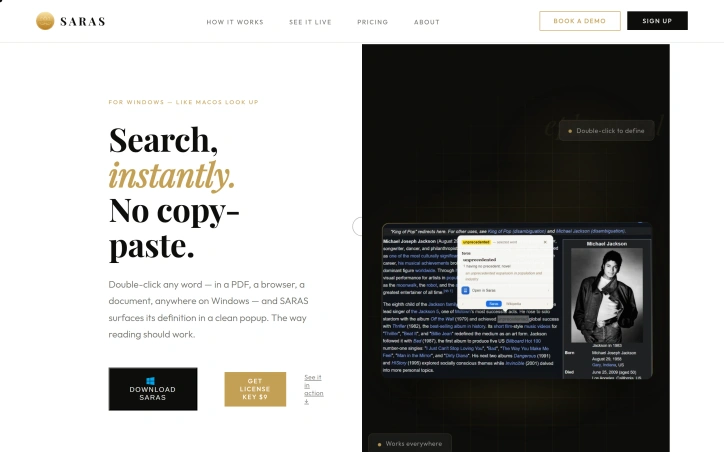
Double-clicking any word on a Windows screen surfaces its definition in a clean popup. SARAS allows users to instantly access word definitions while reading various types of text, including PDFs, browser content, Word documents, Notepad, and emails. The tool works everywhere text is visible on Windows, with no limitations or exceptions. When a user double-clicks a word, a minimal definition card appears, providing rich definitions, etymology, multiple meanings, and usage examples. The popup dismisses with a click or by scrolling on, allowing users to stay focused on their reading. SARAS runs silently in the background, using almost no resources, making it suitable for serious readers who need uninterrupted access to word definitions. The developer, a reader themselves, built SARAS to replicate the macOS Look Up feature, which enables effortless double-click-to-define functionality. SARAS works on all Windows versions, with unlimited word lookups and all future updates included, for a single payment with no subscriptions. Support is available via email at [email protected]. SARAS is designed for readers who consume dense texts, such as papers, articles, and books.
Updated 6/1/2026
Key Features
Instant Definitions
provides rich definitions with a double-click on any word
Universal Compatibility
works everywhere text is visible on Windows
Minimal Interface
dismisses definition card with a click or by scrolling on
Low Resource Usage
runs silently in the background using almost no resources
Unlimited Lookups
offers unlimited word lookups for a single payment
Use Cases
01
Serious Readers — suitable for those who need uninterrupted access to word definitions
02
Dense Text Consumers — designed for readers who consume dense texts like papers and books
03
Windows Users — replicates the macOS Look Up feature for Windows users
Ratings & reviews
No reviews yet. Be the first!
Preview
Site info
- Domain
- getsaras.com
- Status
- Active
- Listed since
- Jun 2026
- Domain age
- < 1 year
- SSL
- Secure
- Language
- en
Related listings
 Sponsor