SyncBatch – Bulk Contact Upload & Excel Contact Sync
syncbatch.inovuslabs.org
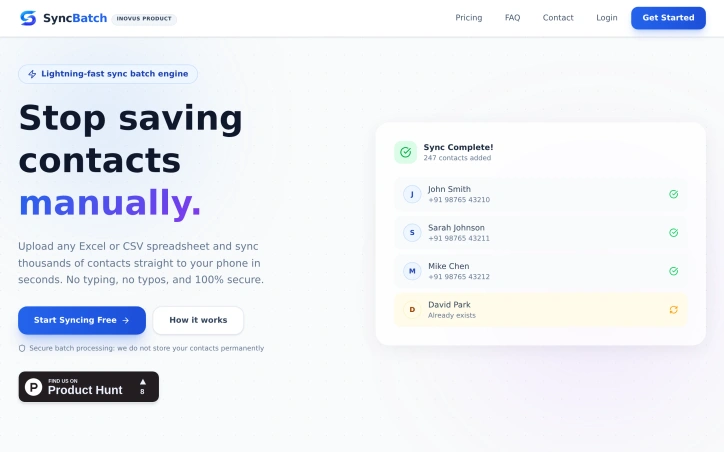
Simplify your contact sync workflow. Upload Excel/CSV files and run instant bulk sync tasks directly to mobile phones via Google Contacts or VCF.
Video Review
0:00 / 0:00
About
SyncBatch – Bulk Contact Upload & Excel Contact Sync
Uploading Excel or CSV files enables instant contact synchronization to Android and iPhone devices. The process involves three simple steps: uploading a spreadsheet containing contact names, phone numbers, and emails; previewing the parsed contact list while automatically removing duplicates and mapping columns; and then syncing contacts instantly to Android Google Contacts or downloading as a vCard file for iPhone.
The contact synchronization process is secure, with batch processing that syncs contacts in parallel without storing the contacts permanently. Duplicate contacts are automatically detected and skipped, ensuring a clean phonebook. The process works with both Android, through Google Contacts, and iPhone, via vCard files.
The application is designed with privacy in mind, operating on a privacy-first architecture where uploaded contact files are processed in-memory for the duration of the sync and never stored in databases. Users can create teams, invite members, and send sync requests.
Pricing is based on a pay-per-sync model with affordable credit packs available, and the first sync is free. Support is available via email with a response time of within 24 hours. The application adheres to the Google API Services User Data Policy and uses enterprise-grade encryption to keep data private. It is used by students, teachers, and institutions.
Updated 5/30/2026
Key Features
Batch Processing
syncs contacts in parallel without storing them permanently
Duplicate Detection
automatically detects and skips duplicate contacts
Privacy First Architecture
processes uploaded contact files in-memory without storing in databases
Team Collaboration
allows users to create teams, invite members, and send sync requests
Secure Syncing
adheres to Google API Services User Data Policy and uses enterprise-grade encryption
Use Cases
01
Students and Teachers — can instantly sync contacts to their devices
02
Institutions — can use the application for contact management
03
Users with Multiple Devices — can sync contacts across Android and iPhone devices
Ratings & reviews
No reviews yet. Be the first!
Preview
Site info
- Domain
- syncbatch.inovuslabs.org
- Status
- Active
- Listed since
- May 2026
- SSL
- Secure
- Language
- en
- Built with
- CloudflareNext.js
Related listings
 Sponsor