TidyApp - All Messaging Accounts in One Desktop Workspace
tidyapp.site
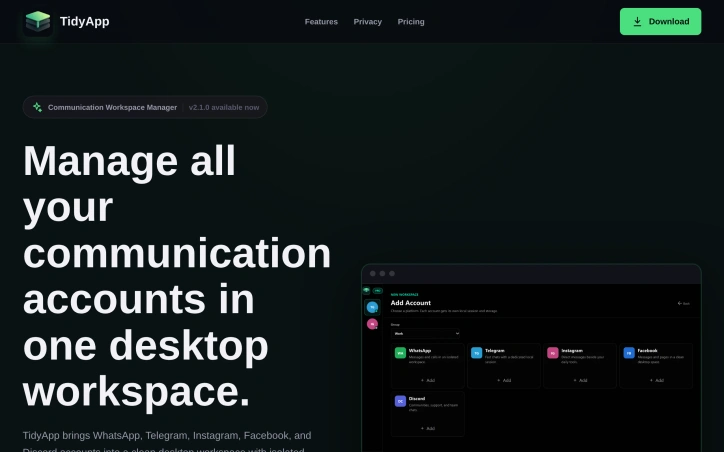
Run WhatsApp, Telegram, Instagram, Facebook, and Discord accounts in one local-first Windows desktop app with Split View, Command Palette, and Quiet Hours.
Video Review
0:00 / 0:00
About
TidyApp - All Messaging Accounts in One Desktop Workspace
Managing multiple communication accounts can be streamlined with a single desktop workspace. TidyApp brings WhatsApp, Telegram, Instagram, Facebook, and Discord accounts into one local-first Windows desktop app, allowing users to keep each account in its own session with isolated storage and workspace state. The app is designed for people who live across more than one inbox, offering independent workspaces organized by context and fast desktop switching.
TidyApp's key features include Split View for managing multiple accounts simultaneously and a Command Palette for quick actions and navigation. Users can group accounts for work, personal, clients, or support, keeping the sidebar calm even on busy days. The app also includes Quiet Hours, RAM Saver, and App Lock for enhanced productivity and privacy. Themes such as Default Dark, AMOLED, and Minimal are available to reduce distractions.
The app manages account metadata and settings locally without adding telemetry, cloud processing, or unnecessary tracking. Notifications come from the supported platforms themselves as native desktop notifications. TidyApp is available for free with basic features, while TidyApp Pro is a one-time purchase that unlocks advanced features including Quiet Hours, priority notifications, custom account details, and local backup and import tools. TidyApp Pro does not require a subscription, and its license is handled through Polar.
Updated 5/30/2026
Key Features
Split View
Allows managing multiple accounts simultaneously.
Command Palette
Enables quick actions and navigation.
Quiet Hours
Enhances productivity and privacy.
App Lock
Provides additional privacy protection.
RAM Saver
Optimizes system resources.
Use Cases
01
People with multiple inboxes — Can organize accounts by context.
02
Busy professionals — Can keep their sidebar calm even on busy days.
03
Users requiring privacy — Can manage accounts without telemetry or cloud processing.
Ratings & reviews
No reviews yet. Be the first!
Preview
Site info
- Domain
- tidyapp.site
- Status
- Active
- Listed since
- May 2026
- Domain age
- < 1 year
- SSL
- Secure
- Language
- en
Related listings



 Sponsor